AL-Go for GitHub – our journey to 100+ repos
I’m a really big fan and user of AL-Go for GitHub, so fair warning: this post is partly colored by my own preferences 😉
For those who don’t know it: AL-Go for GitHub is Microsoft’s set of templates and actions for CI/CD of Business Central apps on GitHub.
We’re an organization that uses AL-Go for GitHub heavily, and we’re genuinely happy with it. We’ve used it more or less since Microsoft released it. We’ve been along since some of the first versions and have kept sending suggestions along the way – some of which (luckily) made it in and are now part of the product.
In our development team, AL-Go for GitHub has become a cornerstone – and a dependency, for better and for worse 😉 The number of options in the settings is incredible and gives a flexibility I haven’t seen anywhere else.
Why AL-Go?
We moved away from Azure DevOps because it was too heavy a tool for our needs. The alternative was to maintain our own build/test system, which would require resources we didn’t have – or didn’t want to spend on it.
(We actually ran on a homebrew system for quite a while. It gave us a lot of insight into how BcContainerHelper – back then NavContainerHelper – was put together, so at least it was educational 😉)
At the time, the third-party solutions for AL development on Azure DevOps weren’t very mature and were quite demanding for us to adopt. Maintaining our own build system on top of the very advanced features and security model in Azure DevOps took time and didn’t create enough value for me.
Azure DevOps is a fantastic product, and I fully acknowledge that it solves several of the challenges that still exist on GitHub. But when you don’t use it to its full potential, it creates a lot of extra work.
I looked at GitHub before AL-Go for GitHub was even a thing (whether Microsoft was already working on AL-Go internally, I don’t know). The simpler setup and source code management looked like it could remove some of the things I spent way too long handling manually.
Time for a bit of self-insight: I probably could have made it work on Azure DevOps with the right effort. I just saw that it would take a lot.
Then came AL-Go for GitHub
When Microsoft launched AL-Go for GitHub, it really made sense to clean out Azure DevOps and the homebrew solution in exchange for a standard solution on a simpler platform.
Back then, a few features were missing that kept us from jumping on it. Luckily, Microsoft was very responsive and held some roundtables at Directions for Partners, where we could explain our needs. They solved them for us – for example being able to run a test and a production version of the code (microsoft/AL-Go#293). A number of smaller challenges and ideas were solved as well.
All credit is due to the AL-Go team at Microsoft – and to their former lead – for listening, engaging with partners and turning our feedback into real features 😊
Once that was in place, we started testing AL-Go. It took time and required careful consideration. Choosing the future development platform for a company is a serious decision – it’s as much an opt-out as an opt-in.
For example, our own system could handle both FOB and extensions in combination. That was one of the things we had to give up, accepting that FOB was dead from a DevOps perspective.
Going live – with a few extras
After a long time (probably close to one year), we took the plunge with AL-Go, with a couple of extra setups.
We used a custom version of AL-Go to support some of our processes. Back then, several of our really large projects were OnPrem, which required some functions and rules that the AL-Go version at the time couldn’t support.
Our biggest issue was actually time. Running a full build is time-consuming, and running a “flat” build (compile without containers) misses some necessary validations.
So instead of fighting our way through the GitHub-hosted runners, we looked at managing the infrastructure ourselves with GitHub self-hosted runners. Running Docker in a hosted Azure managed instance was the first go-to, but it wasn’t easy with the AL-Go versions of that time. So we ended up running a couple of build servers in Azure, each able to run a number of runners at once.
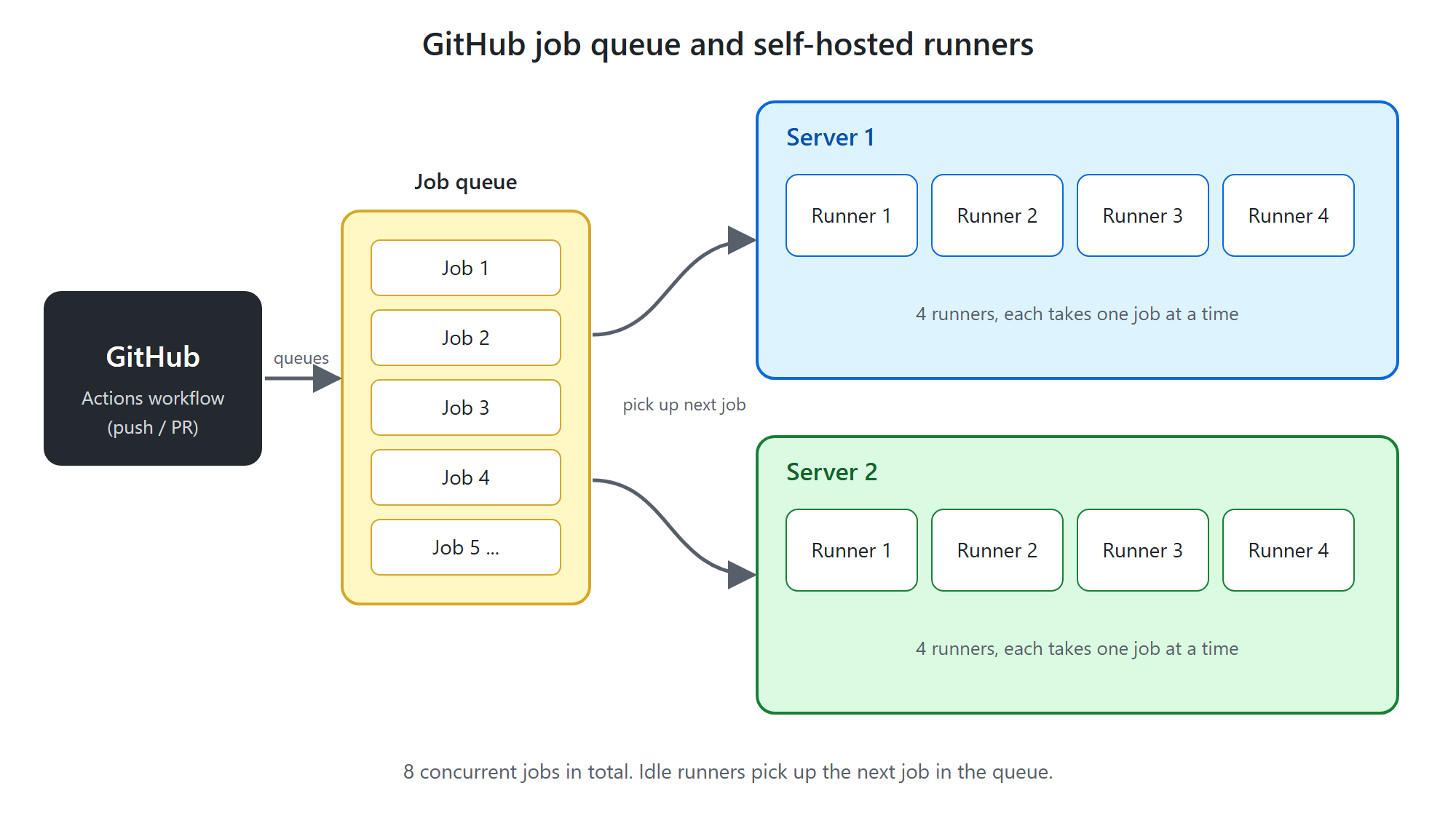
That way we could use caching on the servers and avoid waiting for AL-Go to download a whole image every time. That sped up the process significantly – and it’s what allowed us to go live back then 🙂
It also gave us the option to scale up with bigger servers or more servers as needed.
Over the following couple of years a lot happened on the speed front, although it’s something we always want more of 😉 (More wants more.) Incremental builds (partial builds) were one of the suggestions we helped test and propose back in 2024 (microsoft/AL-Go#1365).
The runner that dies after 14 days
We also got hit by something as annoying as a GitHub runner being removed when it hasn’t run a job for 14 days. From the GitHub docs:
A self-hosted runner is automatically removed from GitHub if it has not connected to GitHub Actions for more than 14 days.
That was a problem, because if our self-hosted runners hadn’t been used for a while (vacation, number of runners vs. number of jobs), they would simply die.
So we ended up creating an internal repo with a YAML file per runner, whose only purpose is to run a Write-Host twice a week:
name: Keep Deployer Agent alive
on:
  schedule:
    # * is a special character in YAML so you have to quote this string
    # At 10:00am on Sunday and Thursday
    - cron:  '0 10 * * 0,4'
jobs:
  scripts:
    runs-on: XXX-01 # the label of the self-hosted runner to keep alive
    steps:
      - run: Write-Host "Keep Github runner alive"
        shell: powershell
And that’s how our internal AL-Go Management repo was born. For a long time, we’ve used it to host internal guides, code snippets and other fascinating things.
The real problem: 100+ repos
The first symptom actually showed up somewhere else. When I started Update AL-Go System Files (manually) in a lot of repos at once, updating 20+ repos took so long that it blocked the regular builds our developers needed to keep working.
It really hit home when I was updating 70+ repos – times a TESTING and a main branch – over a weekend. They hadn’t finished by Monday and were blocking a lot of other tasks.
So I needed some kind of notification when the build servers were overloaded or had more than a certain number of jobs in the queue.
I dug through GitHub’s API documentation and found that I could loop through the repos and find the ones with queued jobs.
With the power of GitHub Copilot, that became the next YAML script in our AL-Go Management repo. It runs at regular intervals and sends notifications about queued jobs, so I can adjust the number of runners accordingly. (Spoiler alert: at some point this is going to change from manual to automatic 😉)
But the queue was only a symptom. That brings me to the problem that is really the point of this post: How do you keep more than 100 AL-Go repositories up to date without turning maintenance into a full-time manual job?
Now that we’ve passed 100 repos, maintaining, updating and analyzing all of them has become a challenge – especially when Microsoft, as they have to, retires older versions of AL-Go.
Even just setting up Update AL-Go System Files on 100+ repos and making sure it actually runs has become too much to handle, and it needs to be automated. It’s been a “we’ll get back to it” task, and we could live with doing it manually until we found the time.
But now was the time – and with “The Power of Claude”, this was going to get handled 😉
Finding the approach
On a few repos, I had already set up Update AL-Go System Files on a cron schedule, so they update automatically.
I started by looking at whether I could write a piece of code that clones all repos, drops a YAML file into each of them and pushes it back up. Even though that would work, it would still be a manual action – and something I’d definitely have to revisit later when Microsoft changes how updates work. Not something I’d look forward to doing on 100+ repos.
So what could the next step be? I went back to GitHub’s API documentation and discovered how much you can actually achieve that way.
I looked into different approaches and landed on an Azure Function that triggers Update AL-Go System Files in each repo. I even got as far as a proof of concept I could deploy.
But then the thought hit me: why use an extra platform at all? We already had a repo with YAML files being run on a schedule.
What if I could build a GitHub Action that runs on a cron schedule, calls each repo and runs Update AL-Go System Files? That had to be possible.
The next step was therefore to write a more comprehensive requirements specification and use it as the starting point for an agentic development flow. And with that, my next agentic AI adventure begins 🙂
Enjoyed this post? Never miss a future one – follow the blog by email.