<?xml version="1.0" encoding="utf-8"?><feed xmlns="http://www.w3.org/2005/Atom" ><generator uri="https://jekyllrb.com/" version="3.10.0">Jekyll</generator><link href="https://dksander.dev/feed.xml" rel="self" type="application/atom+xml" /><link href="https://dksander.dev/" rel="alternate" type="text/html" /><updated>2026-10-16T19:31:42+00:00</updated><id>https://dksander.dev/feed.xml</id><title type="html">dksander</title><subtitle>Blog about code, Business Central/AL, DevOps, and other projects</subtitle><author><name>Lars Sander</name></author><entry><title type="html">AL-Go for GitHub – our journey to 100+ repos</title><link href="https://dksander.dev/2026/10/15/al-go-for-github-our-journey-to-100-repos/" rel="alternate" type="text/html" title="AL-Go for GitHub – our journey to 100+ repos" /><published>2026-10-15T05:00:00+00:00</published><updated>2026-10-15T05:00:00+00:00</updated><id>https://dksander.dev/2026/10/15/al-go-for-github-our-journey-to-100-repos</id><content type="html" xml:base="https://dksander.dev/2026/10/15/al-go-for-github-our-journey-to-100-repos/"><![CDATA[<p>I’m a really big fan and user of AL-Go for GitHub, so fair warning: this post is partly colored by my own preferences 😉</p>

<p>For those who don’t know it: <a href="https://github.com/microsoft/AL-Go">AL-Go for GitHub</a> is Microsoft’s set of templates and actions for CI/CD of Business Central apps on GitHub.</p>

<p>We’re an organization that uses AL-Go for GitHub heavily, and we’re genuinely happy with it. We’ve used it more or less since Microsoft released it. We’ve been along since some of the first versions and have kept sending suggestions along the way – some of which (luckily) made it in and are now part of the product.</p>

<p>In our development team, AL-Go for GitHub has become a cornerstone – and a dependency, for better and for worse 😉 The number of options in the <a href="https://github.com/microsoft/AL-Go/blob/main/Scenarios/settings.md">settings</a> is incredible and gives a flexibility I haven’t seen anywhere else.</p>

<h2 id="why-al-go">Why AL-Go?</h2>

<p>We moved away from Azure DevOps because it was too heavy a tool for our needs. The alternative was to maintain our own build/test system, which would require resources we didn’t have – or didn’t want to spend on it.</p>

<p>(We actually ran on a homebrew system for quite a while. It gave us a lot of insight into how BcContainerHelper – back then NavContainerHelper – was put together, so at least it was educational 😉)</p>

<p>At the time, the third-party solutions for AL development on Azure DevOps weren’t very mature and were quite demanding for us to adopt. Maintaining our own build system on top of the very advanced features and security model in Azure DevOps took time and didn’t create enough value for me.</p>

<p>Azure DevOps is a fantastic product, and I fully acknowledge that it solves several of the challenges that still exist on GitHub. But when you don’t use it to its full potential, it creates a lot of extra work.</p>

<p>I looked at GitHub before AL-Go for GitHub was even a thing (whether Microsoft was already working on AL-Go internally, I don’t know). The simpler setup and source code management looked like it could remove some of the things I spent way too long handling manually.</p>

<p>Time for a bit of self-insight: I probably <em>could</em> have made it work on Azure DevOps with the right effort. I just saw that it would take a lot.</p>

<h2 id="then-came-al-go-for-github">Then came AL-Go for GitHub</h2>

<p>When Microsoft launched AL-Go for GitHub, it really made sense to clean out Azure DevOps and the homebrew solution in exchange for a standard solution on a simpler platform.</p>

<p>Back then, a few features were missing that kept us from jumping on it. Luckily, Microsoft was very responsive and held some roundtables at Directions for Partners, where we could explain our needs. They solved them for us – for example being able to run a test and a production version of the code (<a href="https://github.com/microsoft/AL-Go/issues/293">microsoft/AL-Go#293</a>). A number of smaller challenges and ideas were solved as well.</p>

<p>All credit is due to the AL-Go team at Microsoft – and to their former lead – for listening, engaging with partners and turning our feedback into real features 😊</p>

<p>Once that was in place, we started testing AL-Go. It took time and required careful consideration. Choosing the future development platform for a company is a serious decision – it’s as much an opt-out as an opt-in.</p>

<p>For example, our own system could handle both FOB and extensions in combination. That was one of the things we had to give up, accepting that FOB was dead from a DevOps perspective.</p>

<h2 id="going-live--with-a-few-extras">Going live – with a few extras</h2>

<p>After a long time (probably close to one year), we took the plunge with AL-Go, with a couple of extra setups.</p>

<p>We used a custom version of AL-Go to support some of our processes. Back then, several of our really large projects were OnPrem, which required some functions and rules that the AL-Go version at the time couldn’t support.</p>

<p>Our biggest issue was actually time. Running a full build is time-consuming, and running a “flat” build (compile without containers) misses some necessary validations.</p>

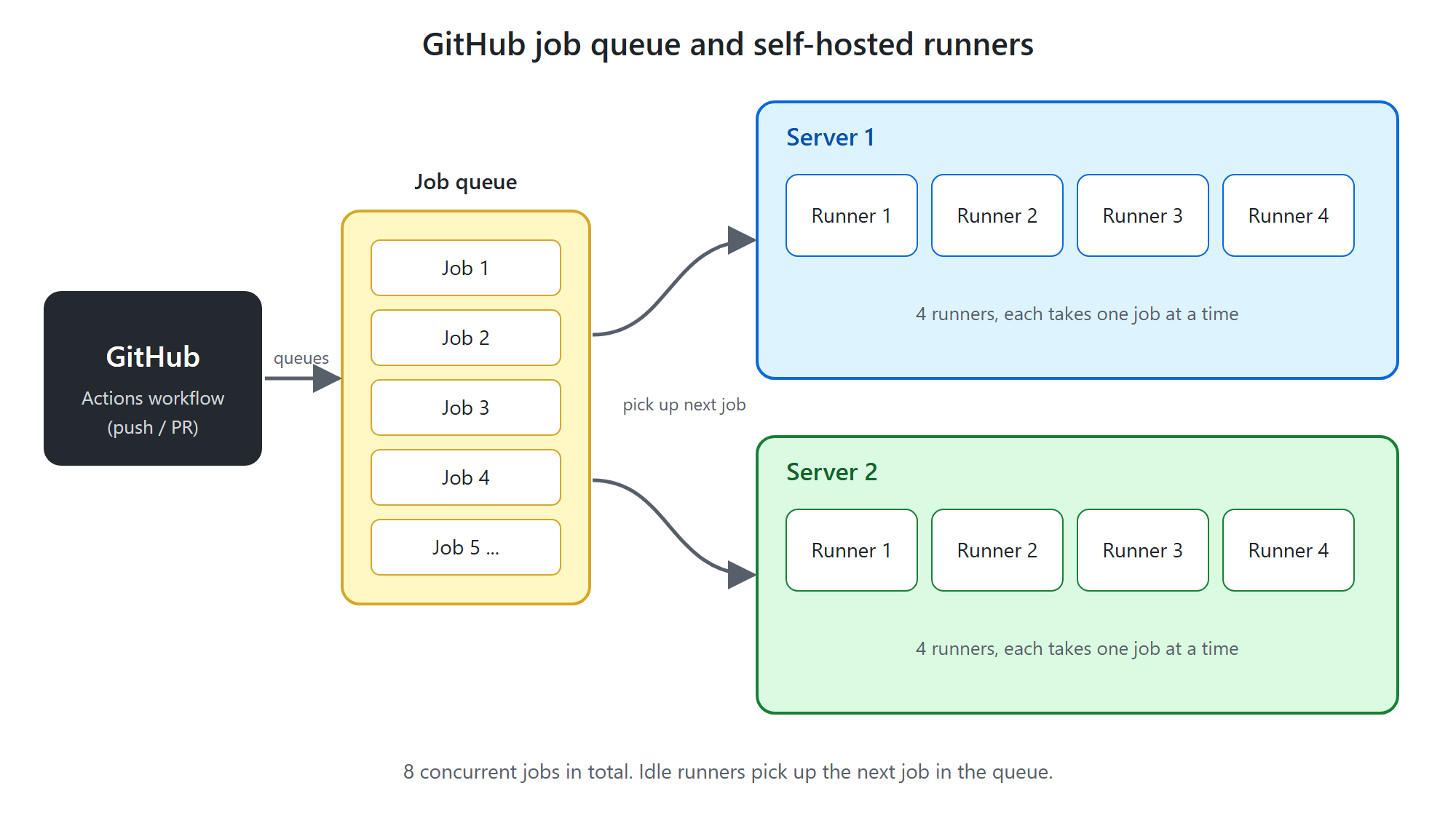
<p>So instead of fighting our way through the GitHub-hosted runners, we looked at managing the infrastructure ourselves with GitHub self-hosted runners. Running Docker in a hosted Azure managed instance was the first go-to, but it wasn’t easy with the AL-Go versions of that time. So we ended up running a couple of build servers in Azure, each able to run a number of runners at once.</p>

<p><img src="/assets/github-runners-diagram.png" alt="GitHub job queue and self-hosted runners" /></p>

<p>That way we could use caching on the servers and avoid waiting for AL-Go to download a whole image every time. That sped up the process significantly – and it’s what allowed us to go live back then 🙂</p>

<p>It also gave us the option to scale up with bigger servers or more servers as needed.</p>

<p>Over the following couple of years a lot happened on the speed front, although it’s something we always want more of 😉 (More wants more.) Incremental builds (partial builds) were one of the suggestions we helped test and propose back in 2024 (<a href="https://github.com/microsoft/AL-Go/issues/1365">microsoft/AL-Go#1365</a>).</p>

<h2 id="the-runner-that-dies-after-14-days">The runner that dies after 14 days</h2>

<p>We also got hit by something as annoying as a GitHub runner being removed when it hasn’t run a job for 14 days. From the <a href="https://docs.github.com/en/actions/how-tos/manage-runners/self-hosted-runners/remove-runners">GitHub docs</a>:</p>

<blockquote>
  <p>A self-hosted runner is automatically removed from GitHub if it has not connected to GitHub Actions for more than 14 days.</p>
</blockquote>

<p>That was a problem, because if our self-hosted runners hadn’t been used for a while (vacation, number of runners vs. number of jobs), they would simply die.</p>

<p>So we ended up creating an internal repo with a YAML file per runner, whose only purpose is to run a <code class="language-plaintext highlighter-rouge">Write-Host</code> twice a week:</p>

<div class="language-yaml highlighter-rouge"><div class="highlight"><pre class="highlight"><code><span class="na">name</span><span class="pi">:</span> <span class="s">Keep Deployer Agent alive</span>
<span class="na">on</span><span class="pi">:</span>
  <span class="na">schedule</span><span class="pi">:</span>
    <span class="c1"># * is a special character in YAML so you have to quote this string</span>
    <span class="c1"># At 10:00am on Sunday and Thursday</span>
    <span class="pi">-</span> <span class="na">cron</span><span class="pi">:</span>  <span class="s1">'</span><span class="s">0</span><span class="nv"> </span><span class="s">10</span><span class="nv"> </span><span class="s">*</span><span class="nv"> </span><span class="s">*</span><span class="nv"> </span><span class="s">0,4'</span>
<span class="na">jobs</span><span class="pi">:</span>
  <span class="na">scripts</span><span class="pi">:</span>
    <span class="na">runs-on</span><span class="pi">:</span> <span class="s">XXX-01</span> <span class="c1"># the label of the self-hosted runner to keep alive</span>
    <span class="na">steps</span><span class="pi">:</span>
      <span class="pi">-</span> <span class="na">run</span><span class="pi">:</span> <span class="s">Write-Host "Keep Github runner alive"</span>
        <span class="na">shell</span><span class="pi">:</span> <span class="s">powershell</span>
</code></pre></div></div>

<p>And that’s how our internal <strong>AL-Go Management repo</strong> was born. For a long time, we’ve used it to host internal guides, code snippets and other fascinating things.</p>

<h2 id="the-real-problem-100-repos">The real problem: 100+ repos</h2>

<p>The first symptom actually showed up somewhere else. When I started Update AL-Go System Files (manually) in a lot of repos at once, updating 20+ repos took so long that it blocked the regular builds our developers needed to keep working.</p>

<p>It really hit home when I was updating 70+ repos – times a TESTING and a main branch – over a weekend. They hadn’t finished by Monday and were blocking a lot of other tasks.</p>

<p>So I needed some kind of notification when the build servers were overloaded or had more than a certain number of jobs in the queue.</p>

<p>I dug through <a href="https://docs.github.com/en/rest/actions/workflow-runs?apiVersion=2026-03-10#list-workflow-runs-for-a-repository">GitHub’s API documentation</a> and found that I could loop through the repos and find the ones with queued jobs.</p>

<p>With the power of GitHub Copilot, that became the next YAML script in our AL-Go Management repo. It runs at regular intervals and sends notifications about queued jobs, so I can adjust the number of runners accordingly. (Spoiler alert: at some point this is going to change from manual to automatic 😉)</p>

<p>But the queue was only a symptom. That brings me to the problem that is really the point of this post: <strong>How do you keep more than 100 AL-Go repositories up to date without turning maintenance into a full-time manual job?</strong></p>

<p>Now that we’ve passed 100 repos, maintaining, updating and analyzing all of them has become a challenge – especially when Microsoft, as they have to, retires older versions of AL-Go.</p>

<p>Even just setting up <em>Update AL-Go System Files</em> on 100+ repos and making sure it actually runs has become too much to handle, and it needs to be automated. It’s been a “we’ll get back to it” task, and we could live with doing it manually until we found the time.</p>

<p>But now was the time – and with “The Power of Claude”, this was going to get handled 😉</p>

<h2 id="finding-the-approach">Finding the approach</h2>

<p>On a few repos, I had already set up Update AL-Go System Files on a cron schedule, so they update automatically.</p>

<p>I started by looking at whether I could write a piece of code that clones all repos, drops a YAML file into each of them and pushes it back up. Even though that would work, it would still be a manual action – and something I’d definitely have to revisit later when Microsoft changes how updates work. Not something I’d look forward to doing on 100+ repos.</p>

<p>So what could the next step be? I went back to <a href="https://docs.github.com/en/rest?apiVersion=2026-03-10">GitHub’s API documentation</a> and discovered how much you can actually achieve that way.</p>

<p>I looked into different approaches and landed on an Azure Function that triggers Update AL-Go System Files in each repo. I even got as far as a proof of concept I could deploy.</p>

<p>But then the thought hit me: why use an extra platform at all? We already had a repo with YAML files being run on a schedule.</p>

<p>What if I could build a GitHub Action that runs on a cron schedule, calls each repo and runs Update AL-Go System Files? That had to be possible.</p>

<p>The next step was therefore to write a more comprehensive requirements specification and use it as the starting point for an agentic development flow. And with that, my next agentic AI adventure begins 🙂</p>]]></content><author><name>Lars Sander</name></author><category term="bc" /><category term="al" /><category term="devops" /><summary type="html"><![CDATA[I’m a really big fan and user of AL-Go for GitHub, so fair warning: this post is partly colored by my own preferences 😉]]></summary></entry><entry><title type="html">Day three - aaaaaaand some more days</title><link href="https://dksander.dev/2026/10/05/day-three-and-some-more-days/" rel="alternate" type="text/html" title="Day three - aaaaaaand some more days" /><published>2026-10-05T05:00:00+00:00</published><updated>2026-10-05T05:00:00+00:00</updated><id>https://dksander.dev/2026/10/05/day-three-and-some-more-days</id><content type="html" xml:base="https://dksander.dev/2026/10/05/day-three-and-some-more-days/"><![CDATA[<p>It’s been more than the three days I had planned to wait before writing a summary – but time flies when you are having fun learning and exploring a new tool 😉</p>

<h2 id="what-do-i-still-miss-about-github-copilot">What do I still miss about GitHub Copilot?</h2>

<p>The whole integration with GitHub is fantastic. Claude obviously isn’t built in, so it now feels like something is missing when I work directly in GitHub.</p>

<p>GitHub Copilot also makes all the Git tasks easier – including commit messages, pull request reviews and pull request summaries. I don’t get any of that in the same way with Claude Code.</p>

<p>On the flip side, GitHub Copilot doesn’t inspire me to do agentic development in the same way. For me, it’s more of a help with everyday development that makes the process faster.</p>

<p>In GitHub Copilot’s defense, I haven’t tried GitHub Copilot CLI yet. That is still on my todo list 😉</p>

<h2 id="where-do-i-stand-with-claude">Where do I stand with Claude?</h2>

<p>Claude has become my daily driver. For the way I work right now, it delivers everything I expect from an AI coding tool – and then some. It feels fast, capable and suited to agentic development.</p>

<p>I do acknowledge that part of this preference may come from the ecosystem around the tools. I encounter far more blog posts, reels and practical examples about Claude than about GitHub Copilot, and that constant stream of ideas makes it easier to discover new ways of working. If Microsoft invested more in practical material – blog posts, videos and real-world examples – I think GitHub Copilot would appeal to me more.</p>

<h2 id="what-about-the-next-month">What about the next month?</h2>

<p>I’m going to keep using Claude Code because it inspires me and makes me want to learn even more. Over the next month, I also want to explore the differences between CLI and GUI tools and understand where each approach works best 😊</p>

<p>So for the next month, at least, I’m not going back to GitHub Copilot as my primary tool 😉</p>

<h2 id="rant-the-developers-of-the-future">Rant: the developers of the future</h2>

<p><em>Warning: What follows is a rant with no real professional content.</em></p>

<p>That decision leaves me with a bigger question. If agentic development can change my own workflow this quickly, what will AI mean for the developers of the future?</p>

<ul>
  <li>Is there a future for experienced developers?</li>
  <li>Is there a future for new, young developers?</li>
  <li>Is the developer of the future a junior developer with an AI subscription?</li>
</ul>

<p>I’ve reached an age where my way into the developer world consisted of sitting up at two in the morning, finding the same StackOverflow thread for the fifth time. Yes, StackOverflow 😅 – that was the place to be 😉</p>

<p>My introduction to NAV went: “If you press F1 in the development environment, you can read about how to code. Figure out the rest yourself.” You had to be active in various forums, both to learn something and, in time, to be able to help others yourself.</p>

<p>Today, we hardly dare give junior developers that kind of space. The immediate concern is often billable time: What if they spend hours learning instead of delivering? But learning is part of becoming a developer, and junior developers need room to learn, make mistakes and grow. Then comes the next concern: A junior developer with AI won’t learn properly and will only produce AI slop. Some probably will. But plenty of experienced developers already ignore best practices, so I don’t believe AI automatically makes the situation worse. On balance, I believe it can help create better codebases.</p>

<p>But where am I going with this rant? The next generation of developers learns to use AI from the start, and many are afraid that they therefore won’t learn to code the old way.</p>

<p>But honestly, the new generation of developers brings a different set of skills. They will grow up learning how to question AI output, test it and combine it with their own judgement. If we give them the right guidance, I believe AI can help them become even better developers than those of us from the previous generation.</p>

<p>I think we should expect more DevOps, better testing and faster development cycles. The developers of the future may spend less time losing four days to debugging – not because they understand less, but because they have better tools for finding the answer. AI won’t remove the need to learn; it will change what developers can achieve while they are learning.</p>]]></content><author><name>Lars Sander</name></author><category term="ai" /><category term="udvikling" /><summary type="html"><![CDATA[It’s been more than the three days I had planned to wait before writing a summary – but time flies when you are having fun learning and exploring a new tool 😉]]></summary></entry><entry><title type="html">Day Two with Claude Code</title><link href="https://dksander.dev/2026/09/17/day-two-with-claude-code/" rel="alternate" type="text/html" title="Day Two with Claude Code" /><published>2026-09-17T10:00:00+00:00</published><updated>2026-09-17T10:00:00+00:00</updated><id>https://dksander.dev/2026/09/17/day-two-with-claude-code</id><content type="html" xml:base="https://dksander.dev/2026/09/17/day-two-with-claude-code/"><![CDATA[<p><em>The following blog post was written with the help of AI.</em></p>

<p>This is day two of my Claude Code experiment, and the more I dig into it, the more I keep discovering about GitHub Copilot too.</p>

<h2 id="looking-at-copilot-differently">Looking at Copilot differently</h2>

<p>The funny thing is that exploring Claude Code has made me realize how many of the same things I might have been able to do with GitHub Copilot — if I had approached it differently.</p>

<p>I probably didn’t ask myself the right question: <em>how much can I actually get out of GitHub Copilot?</em></p>

<p>So the deeper I go into Claude, the more aware I become of what I could have done with Copilot. That gives me another reason to keep digging into Claude Code, but it also makes me want to turn the full setup on for Copilot and see what I’ve been missing there.</p>

<p>Now that Claude Code is up and running, the learning has started.</p>

<h2 id="skills-but-with-a-limit">Skills, but with a limit</h2>

<p>One of the first questions was whether I should install a whole collection of skills, or simply start using Claude Code as it is.</p>

<p>I’ve looked through a couple of skill libraries, and there are <em>a lot</em> of skills available. It would be very easy to install everything that looks interesting and then never really learn how to use any of it.</p>

<p>So I’ve put a limit on myself: a maximum of five skills, and I have to use those before I fetch any more.</p>

<p>That feels like a better way to explore them. Skills should be deliberate tools, not just a collection of things I’ve installed, forgotten about, and don’t really know how to use.</p>

<h2 id="access-to-my-machine">Access to my machine</h2>

<p>One of the biggest reasons I was attracted to Claude was the possibility of having it work directly on my PC — with my files, tools, and the rest of the environment I use every day.
My own limitation has been realizing that GitHub Copilot can also navigate my PC, provided I use the right harness around it. That is an important distinction: perhaps the capability was not missing after all — I simply had not given Copilot the right setup to use it.
The more you learn, I guess 😊</p>

<p>Now I have enabled all access to my PC so I can see how far I can push it. It is a lot of access, and I want to understand what that actually means in practice rather than just guessing.</p>

<h2 id="the-cost-of-leaving-the-microsoft-ecosystem">The cost of leaving the Microsoft ecosystem</h2>

<p>There is a downside, though. I am running Claude Pro, and I have already hit limits that would require a Team plan for some of the things I wanted to try, such as bringing it into Outlook and similar services. Leaving the Microsoft suite of tools means that some of the integrations I am used to require a bit more setup. I will look into that at a later point.</p>

<p>These are the kinds of limitations I did not run into with Copilot. Since Copilot fits into the Microsoft and GitHub ecosystem I was already using, those integrations felt much more natural and did not require the same level of extra setup.</p>

<h2 id="the-things-i-miss-from-copilot">The things I miss from Copilot</h2>

<p>The Claude Code application and the features I get from GitHub Copilot in VS Code are two different things.</p>

<p>Today I wanted to go back to writing some code the old-school way to solve a complete problem. That was when I ran straight into something I had started taking for granted: code completion.</p>

<p>GitHub Copilot’s autocomplete had become a major tool for me in that kind of project. Claude Code doesn’t provide those same VS Code features, because it is built as an agent rather than as an autocomplete tool. That was a bit of a downer. It turns out I was really happy with that part of GitHub Copilot.</p>

<p>I also miss several of the GitHub features I used, such as automatically describing pull requests and similar tasks. Those conveniences are gone when I move that part of my workflow over to Claude, and that is a bit of a bummer.</p>

<h2 id="maybe-the-problem-is-what-i-dont-know">Maybe the problem is what I don’t know</h2>

<p>So I hit a realization about what I am doing.
I do not know what I am doing — I jumped straight into testing without research, which was a bit dumb.
I researched some of the key differences between GitHub Copilot and Claude Code, and I ran into the GitHub Copilot app.
(I suppose I should have used that one before jumping into Claude Code, but I did not know about it.) https://github.com/features/ai/github-app</p>

<p>Like a blind man, I ran to install the GitHub Copilot app to get my old GitHub Copilot features back in VS Code, and I whooped,
best of both worlds! But no, that is not what my experiment is leading up to — I pull myself together and close the GitHub Copilot app.</p>

<p>The learning here is that it confirms I made the switch to Claude on a wrong assumption — I was not getting all that Copilot could do.</p>

<p>That is probably the most useful realization from day two. I am still exploring Claude Code, but I also need to explore GitHub Copilot properly — this time with the full setup and a better understanding of what it can actually do.</p>

<p>I will stay with my challenge and keep getting the Claude experience to its full extent.</p>

<p>PS: did I mention that I used Claude to fix a real GitHub issue from start to finish, and a request for a change on an open pull request? 😉</p>]]></content><author><name>Lars Sander</name></author><category term="ai" /><category term="udvikling" /><summary type="html"><![CDATA[The following blog post was written with the help of AI.]]></summary></entry><entry><title type="html">Base App Contribution</title><link href="https://dksander.dev/2026/09/13/base-app-contribution/" rel="alternate" type="text/html" title="Base App Contribution" /><published>2026-09-13T08:00:00+00:00</published><updated>2026-09-13T08:00:00+00:00</updated><id>https://dksander.dev/2026/09/13/base-app-contribution</id><content type="html" xml:base="https://dksander.dev/2026/09/13/base-app-contribution/"><![CDATA[<p>Here are my two first experiences with contributing to the BC Base App. If anyone else can get something out of them, great.</p>

<h2 id="the-first-one">The first one</h2>

<p>A while back I got a Base App contribution merged into BC Baseapp. The change was approved and merged, and it fixed an actual bug in the product — but I later discovered that even though it was merged, the fix still wasn’t actually in Baseapp for a long time.</p>

<p>Before I complain too much: the whole thing was about a missing <code class="language-plaintext highlighter-rouge">ApplicationArea = All;</code> on a page object. 
I just wanted to save others the headache going forward (<a href="https://github.com/microsoft/ALAppExtensions/issues/28330">microsoft/ALAppExtensions#28330</a>). 
Then, many months later, I suddenly noticed it actually <em>was</em> in Baseapp. 
I don’t know exactly how long it took, but from the outside it was a long process.</p>

<p>For anyone who’s curious: this was actually one of the earlier open-source repos Microsoft used to test the process, before they moved Base App over to BCApps. So it was one of the earlier proposals under that setup. In the meantime, Microsoft has since moved everything over to BCApps.</p>

<h2 id="the-second-one">The second one</h2>

<p>Now to my most recent experience, with the whole Base App running on GitHub.</p>

<p>A colleague found a problem in Baseapp, and I thought: hmm, if we’re hitting this, others probably are too. Let’s try again. I got a GitHub issue written up, a BC idea filed, and approval to get started.</p>

<p>And then… nothing happened for about a week. Until I went in to check <em>why</em> nothing was happening, and discovered I’d actually gotten a green light the whole time.</p>

<p>So I fired up my evening and VS Code with all the tools turned up. I wrote code that matched the style of standard BC code, followed all the guidelines, added tests, and so on — I was actually pretty happy with it. I opened a pull request against <code class="language-plaintext highlighter-rouge">github.com/microsoft/Baseapp</code>.</p>

<p>Then there are a few steps to get through — Copilot review, some license signing — and then, again, nothing happened for a couple of weeks. I started wondering what the actual timeline looked like. Then I got my first review comment, which gave me something to think about, so I let it sit in the back of my mind for a couple of weeks while I found the time and got my thoughts straight.</p>

<p>Then I got the itch to finish it — partly because closing it out would let me kill two birds with one stone for a couple of customers I was working with. So I gave it another go, but this time with Claude Code as the driver.</p>

<p>By that point, it had been weeks since I’d opened the pull request, so I no longer had the environment I’d originally used to develop it, or anything else set up. Claude Code figured out the change was still valid, so I asked it to test it. It found out it could run a full AL-Go build — but since even Claude considered that a long, time-consuming task, I let the code get tested through the CI/CD flow on my own GitHub instead.</p>

<p>Naturally, quite a bit had happened on <code class="language-plaintext highlighter-rouge">main</code> in the meantime, and Claude actually came up with a sensible git plan:</p>

<blockquote>

  <ul>
    <li>Your fork (<code class="language-plaintext highlighter-rouge">xxx:main</code>) is <strong>478 commits behind</strong> <code class="language-plaintext highlighter-rouge">microsoft:main</code>, but also 2 commits ahead (your “Add External Document No. field…” commit plus an earlier merge commit).</li>
    <li>Your open PR (<a href="https://github.com/microsoft/BCApps/pull/10064">microsoft/BCApps#10064</a>) goes from <code class="language-plaintext highlighter-rouge">xxx:main</code> → <code class="language-plaintext highlighter-rouge">microsoft:main</code>. Since the PR uses <code class="language-plaintext highlighter-rouge">main</code> directly as the branch, GitHub will automatically update the PR once you push new commits to <code class="language-plaintext highlighter-rouge">xxx:main</code> — you don’t need to open a new one.</li>
    <li>The same file (<code class="language-plaintext highlighter-rouge">CreateBillingDocuments.Codeunit.al</code>) has been changed several times upstream since your fork was made, so a merge could potentially conflict with your local, uncommitted change.</li>
  </ul>

  <p><strong>The plan I’m suggesting:</strong></p>
  <ol>
    <li><code class="language-plaintext highlighter-rouge">git stash -u</code> — temporarily set your local change aside</li>
    <li><code class="language-plaintext highlighter-rouge">git merge upstream/main</code> — pull in the 478 upstream commits into your local <code class="language-plaintext highlighter-rouge">main</code> (same approach you used last time, per your earlier merge commit)</li>
    <li><code class="language-plaintext highlighter-rouge">git stash pop</code> — put your change back on top (resolve any conflict if one comes up)</li>
    <li>Commit your change</li>
    <li><code class="language-plaintext highlighter-rouge">git push origin main</code> — this automatically updates PR #10064 with both the upstream sync and your new change</li>
  </ol>

  <p>I’d like to test steps 1–3 locally first (reversible, no push yet) to see if any conflicts show up, before we touch anything on GitHub. Should I go ahead with that?</p>
</blockquote>

<p>Instead of me having to walk through every step manually, Claude just served it up directly. Smart.</p>

<p>I’ve now gotten my old pull request restarted, so we’ll see over the coming weeks whether anything new happens here.</p>]]></content><author><name>Lars Sander</name></author><category term="bc" /><category term="al" /><summary type="html"><![CDATA[Here are my two first experiences with contributing to the BC Base App. If anyone else can get something out of them, great.]]></summary></entry><entry><title type="html">What to expect?</title><link href="https://dksander.dev/2026/09/13/what-to-expect/" rel="alternate" type="text/html" title="What to expect?" /><published>2026-09-13T06:00:00+00:00</published><updated>2026-09-13T06:00:00+00:00</updated><id>https://dksander.dev/2026/09/13/what-to-expect</id><content type="html" xml:base="https://dksander.dev/2026/09/13/what-to-expect/"><![CDATA[<h2 id="what-is-this-blog-actually-about">What is this blog actually about?</h2>

<p>What am I actually going to use this blog for?</p>

<p>First and foremost, it’s for myself — a place where I can share the thoughts I keep having about the tech stack I work with. I have no goals or ambitions about hitting a certain number of posts. It will happen whenever I get inspired by a thought or an idea. Right now, for me, it’s about testing those thoughts out with AI and agents — and seeing where that leads.</p>

<p>Do I hope this eventually turns into a tech book? Yes, of course I do. But that’s not the goal right now.</p>

<p>I write when I have an idea, or when I get inspired by something happening in my corner of the tech world. My basic mindset whenever some new IT news comes up is: <em>“I haven’t tried that before — I can probably figure it out.”</em> Where that quote is from, I honestly don’t know.</p>

<h2 id="a-note-on-how-this-has-been-written-so-far">A note on how this has been written so far</h2>

<p>A lot of the content so far has been AI-generated based on my thoughts — but still, quite a lot AI-generated. That’s something I want to change in the coming posts.</p>

<p>Here, I use a raw text editor — in my case, Notepad++. This isn’t an ad; it’s just to explain that I start out in a completely raw text editor, without AI or any other help. That’s simply how my thoughts work best: no spell-check, no distractions. Just raw text. My colleagues, if they ever stumble across this, will probably recognize me in Notepad ;-)</p>

<p>So, my process is:</p>

<ol>
  <li>I write the text first in a text editor of my choice.</li>
  <li>Then I use a proper text editor to fix spelling and the like.</li>
  <li>Only after that do I let various AI tools read through the text and suggest phrasing.</li>
</ol>

<p>That way, it’s still my thoughts and my writing — just written further with a bit of help from AI 😊</p>]]></content><author><name>Lars Sander</name></author><category term="meta" /><summary type="html"><![CDATA[What is this blog actually about?]]></summary></entry><entry><title type="html">From GitHub Copilot to Claude Code</title><link href="https://dksander.dev/2026/09/10/fra-github-copilot-til-claude-code/" rel="alternate" type="text/html" title="From GitHub Copilot to Claude Code" /><published>2026-09-10T10:00:00+00:00</published><updated>2026-09-10T10:00:00+00:00</updated><id>https://dksander.dev/2026/09/10/fra-github-copilot-til-claude-code</id><content type="html" xml:base="https://dksander.dev/2026/09/10/fra-github-copilot-til-claude-code/"><![CDATA[<p><em>The following blog post was written with the help of AI.</em></p>

<p>I figured I’d start with something I’ve been chewing on myself for a while: my switch from GitHub Copilot to Claude Code.</p>

<h2 id="why-i-started-with-github-copilot">Why I started with GitHub Copilot</h2>

<p>When we first had to choose an AI tool for development, we landed on GitHub Copilot. There were two main reasons for that:</p>

<ol>
  <li><strong>It made sense organizationally.</strong> We already had a GitHub subscription and active Microsoft licenses in-house, and everything sat within the same tenant. That made security, governance, and all the practical stuff pretty straightforward from the start.</li>
  <li><strong>It was easy to get started.</strong> It didn’t require an extra subscription somewhere else, or a bunch of additional setup and approvals. It was simply the fastest and least complicated path forward.</li>
</ol>

<p>Another thing that made Copilot an easy choice was the pricing model. Many of the other AI solutions were already consumption-based back then, which just makes it a bit harder to roll out broadly without first having to think too much about budget, usage, and governance. Copilot wasn’t consumption-based in the same way at that point, so it was simply easier to say: let’s get started and gain some experience with it.</p>

<p>Copilot was the pragmatic choice for me. Not necessarily because I thought it was the technically strongest tool, but because it fit well into the setup we already had.</p>

<h2 id="the-turning-point">The turning point</h2>

<p>Things really started to change when Copilot switched to consumption-based pricing. It made me think: is Copilot still the right choice, or is it now worth taking a more serious look at alternatives like Claude?</p>

<p>I’d actually been sitting with the thought for a while. Copilot still has the big advantage of fitting easily into our existing setup. But when the pricing model changes, and there’s a tool out there that feels stronger for day-to-day development work, it’s hard not to take that seriously.</p>

<p>Two things in particular ended up weighing heavily for me.</p>

<p>The first is that Claude Code can work directly on my own machine. It can navigate the file system, use the command line, and work with the tools I already use daily. It simply fits the way I work better. Instead of everything feeling tied to the editor or a cloud context, the AI can actually help right where the work happens.</p>

<p>The second thing is skills. I think Claude’s skills concept works really well and is a stronger overall package. Copilot could do it too, but it “requires more.”</p>

<h2 id="so-im-taking-the-leap">So I’m taking the leap</h2>

<p>So the conclusion is that I’m now taking the leap and getting started with Claude Code. And as a somewhat fitting start, this blog itself was also set up with help from Claude Code — repository, Jekyll structure, all of it.</p>

<p>So yeah — here we go 🙂</p>

<p>I expect to write more about the experience along the way. Both what works really well, and what takes a bit of getting used to when coming from Copilot and starting to work with Claude Code instead.</p>]]></content><author><name>Lars Sander</name></author><category term="ai" /><category term="udvikling" /><summary type="html"><![CDATA[The following blog post was written with the help of AI.]]></summary></entry></feed>